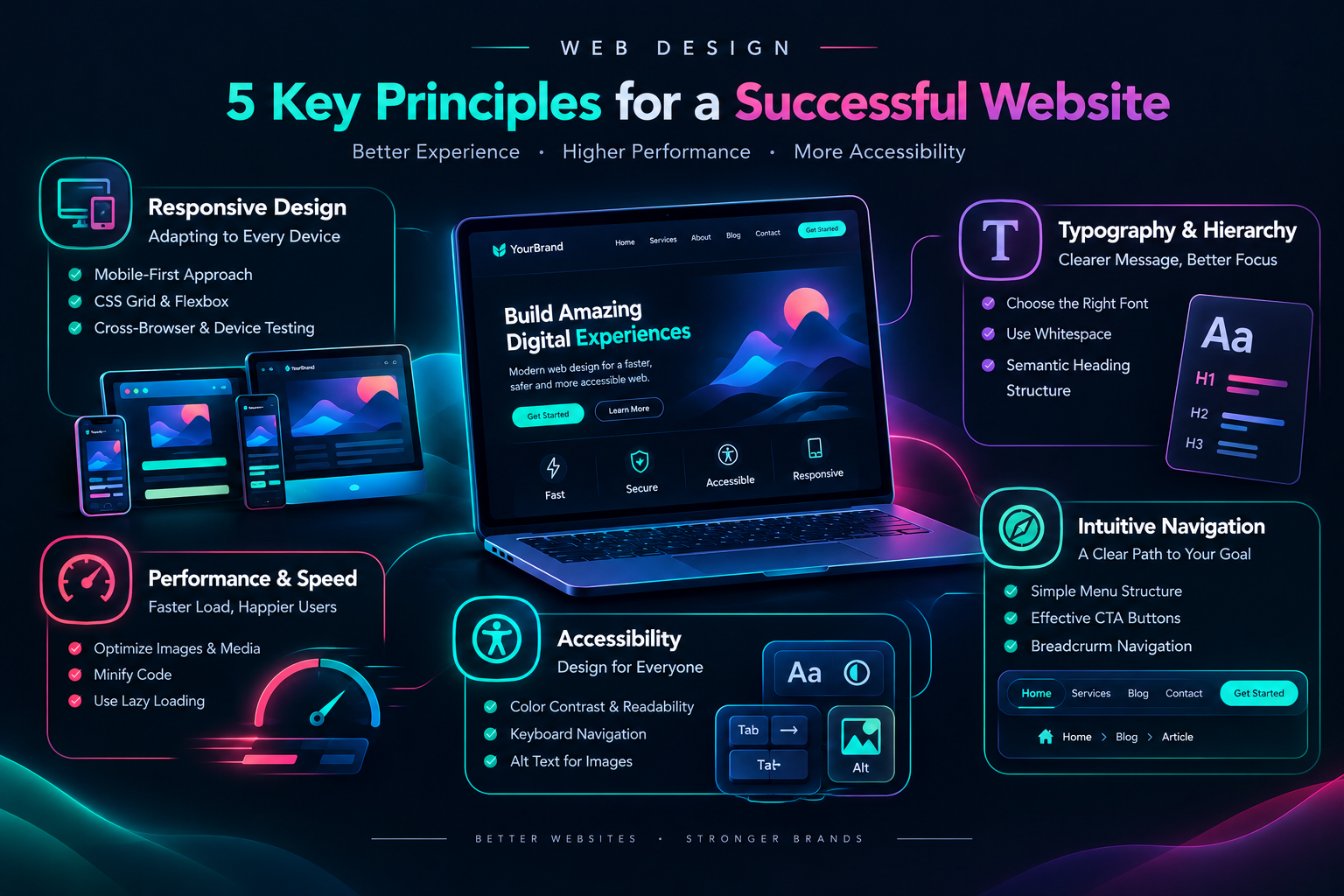
What Is Professional Web Design? 5 Essential Principles for a Successful Website طراحی وب حرفهای چیست؟ بررسی ۵ اصل مهم برای ساخت وبسایتی موفق
What Is Professional Web Design? 5 Essential Principles for a Successful Website
In today's digital world, web design is not limited to choosing colors, images, and visual layouts. A professional website should combine visual appeal, strong performance, security, accessibility, and a positive user experience.
Users expect websites to load quickly, display correctly on different devices, and help them find the information they need without confusion. Problems such as slow loading times, poor mobile layouts, and complicated navigation can reduce user trust and cause visitors to leave a website.
In this article, we explore five essential web design principles that help designers and developers create websites that are functional, reliable, and user-focused.
1. Responsive Design: Adapting to Every Device
Today, users access websites through different devices, including desktop computers, laptops, tablets, and smartphones. For this reason, a website should not be designed for only one screen size.
Responsive Design is an approach that allows a website to adjust its layout, element sizes, and content presentation according to the available screen size.
1.1. The Mobile-First Approach
The Mobile-First approach begins the design process by focusing on smaller screens and then expands the layout for larger devices.
This strategy encourages designers to prioritize the most important content and features from the beginning. As a result, mobile users can interact with the website more comfortably without unnecessary zooming or horizontal scrolling.
1.2. Using CSS Grid and Flexbox
CSS Grid and Flexbox are two important tools for creating flexible layouts on the web. These layout systems allow developers to organize page elements according to available space, screen size, and design requirements.
When used correctly, they help developers build interfaces that work across different devices without relying on complicated or repetitive code.
1.3. Testing Across Browsers and Devices
Responsive design does not end with resizing a browser window. A website should be tested in different browsers, such as Chrome, Firefox, and Safari, as well as on devices with different screen sizes.
Testing menus, forms, images, buttons, and interactive components helps developers identify problems and improve the overall user experience.
2. Website Speed and Performance Optimization
Loading speed is an important part of the user experience. If a page takes too long to display its content, visitors may leave before reading or interacting with it.
Performance optimization includes a set of techniques designed to reduce loading time, limit resource usage, and improve the responsiveness of a website.
2.1. Optimizing Images and Media Files
Large images and videos can increase page size and negatively affect loading performance. Therefore, media files should be optimized before being added to a website.
Modern formats such as WebP and AVIF can reduce file sizes in many situations. Resizing images according to their intended display area and compressing them before uploading can also improve performance.
2.2. Optimizing Client-Side Code
HTML, CSS, and JavaScript files should be kept as efficient as possible. Removing unnecessary code, reducing duplicated resources, and using techniques such as minification can reduce the amount of data sent to the browser.
In larger projects, code splitting, loading only the required resources, and using browser caching correctly can further improve performance.
2.3. Using Lazy Loading
Lazy loading is a technique that delays loading certain resources, such as images, until they are close to the user's visible area.
This approach can reduce the amount of content loaded initially, especially on pages that contain many images or large amounts of content. However, it should be implemented carefully so that important visible content is not unnecessarily delayed.
3. Web Accessibility: Designing for Everyone
A professional website should be usable by as many people as possible, including users who rely on screen readers, keyboards, or other assistive technologies.
Web Accessibility refers to principles and practices that make websites easier to use for people with different abilities and circumstances.
3.1. Color Contrast and Content Readability
Text and background colors should provide enough contrast to make content easy to read. Appropriate contrast is important for users with visual impairments and also improves readability in environments with bright light or different display conditions.
Developers can use accessibility evaluation tools and WCAG guidelines to review color contrast and improve visual readability.
3.2. Keyboard Accessibility
Interactive elements such as links, buttons, and forms should be usable with a keyboard. Users should be able to move between elements with keys such as Tab and perform actions without depending only on a mouse.
A clearly visible focus state is also important because it shows users which element is currently selected.
3.3. Using Alternative Text for Images
Alternative text, commonly known as Alt Text, provides a textual description of an image. It helps screen readers communicate the meaning of visual content to blind and visually impaired users.
Alternative text should be descriptive, concise, and appropriate for the purpose of the image. Decorative images that do not provide meaningful information should be marked appropriately for assistive technologies.
4. Typography and Information Hierarchy
Text is one of the primary tools used to communicate information on a website. Even when a page looks visually attractive, poor text structure and inadequate spacing can make the content difficult to read.
Good typography helps users read information more comfortably, recognize important sections, and understand the structure of an article more quickly.
4.1. Choosing the Right Font
The selected font should match the type of content, the website's language, and the devices used by visitors. Simple and readable fonts are often more suitable for long-form content.
When choosing a font, developers should consider text size, font weight, letter spacing, and how the font appears on different screens.
4.2. Using Whitespace Effectively
Whitespace is an important part of user interface design. Appropriate spacing between lines, paragraphs, headings, and other elements makes a page more organized and improves content readability.
Proper line height and spacing between sections can reduce visual clutter and help users maintain focus while reading.
4.3. Creating a Semantic Heading Structure
Using HTML headings such as H1, H2, and H3 helps create a clear content structure. The main page title is usually represented by H1, while major and minor sections are organized with appropriate heading levels.
A meaningful heading structure improves readability and helps search engines and assistive technologies understand the relationship between different sections of a page.
5. Intuitive and User-Friendly Navigation
Users should be able to find their way through a website without confusion. Effective navigation helps visitors reach the pages, services, and information they need more quickly.
Menus and navigation paths should be predictable, organized, and consistent with the structure of the website.
5.1. Simplifying the Menu Structure
Website menus should use clear and familiar labels, such as Home, Services, Articles, and Contact.
Using too many nested menus or placing excessive options inside a complicated structure can confuse users. Important navigation items should be visible and easy to access.
5.2. Designing Effective Call-to-Action Buttons
Call-to-Action buttons encourage users to perform a specific action. Examples include signing up, making a purchase, submitting a form, and viewing additional details.
Primary buttons should have enough visual distinction through their color, size, text, and position. However, this distinction should not create visual clutter or reduce the readability of the interface.
5.3. Using Breadcrumb Navigation
Breadcrumb navigation shows the user's current location within a website's structure. It can be particularly useful on websites with multiple pages, categories, or nested sections.
Breadcrumbs should be clear and should help users understand their current position and return to previous sections or related categories.
Frequently Asked Questions
Is professional web design only about the appearance of a website?
No. Professional web design also includes performance, accessibility, content structure, security, navigation, and the overall user experience.
Why is responsive design important?
Users access websites on devices with different screen sizes. Responsive design helps ensure that website content is displayed properly on smartphones, tablets, and desktop computers.
Does website speed affect the user experience?
Yes. Slow loading can increase waiting time, reduce user satisfaction, and cause visitors to leave a page. Optimizing images, code, and resource-loading strategies can improve performance.
Who benefits from web accessibility?
Accessibility benefits all users and is especially important for people who rely on screen readers, keyboards, or other assistive technologies.
Are headings important for SEO?
Headings help organize content and make page sections easier to understand. Using headings correctly and semantically can improve readability and accessibility, although SEO performance depends on many different factors.
Conclusion
Professional web design is a combination of art, user experience, and technical engineering. A successful website should not only look attractive but also be fast, responsive, accessible, and easy to navigate.
By following five essential principles—responsive design, performance optimization, accessibility, effective typography, and intuitive navigation—developers can create experiences that help users achieve their goals more comfortably.
Ultimately, the best web design brings technology and visual quality together to serve the user's needs, making the website simple, smooth, and enjoyable to use.
طراحی وب حرفهای چیست؟ بررسی ۵ اصل مهم برای ساخت وبسایتی موفق
در دنیای دیجیتال امروز، طراحی وب فقط به انتخاب رنگها، تصاویر و چیدمان عناصر محدود نمیشود. یک وبسایت حرفهای باید ترکیبی از زیبایی بصری، عملکرد مناسب، امنیت، دسترسیپذیری و تجربه کاربری مطلوب باشد.
کاربران انتظار دارند صفحات وبسایتها در مدت کوتاهی بارگذاری شوند، در دستگاههای مختلف بهدرستی نمایش داده شوند و بتوانند بدون سردرگمی به اطلاعات موردنیاز خود دسترسی پیدا کنند. مشکلاتی مانند سرعت پایین، طراحی نامناسب در موبایل یا منوهای پیچیده میتوانند اعتماد کاربران را کاهش دهند و باعث ترک وبسایت شوند.
در این مقاله، پنج اصل مهم طراحی وب را بررسی میکنیم که به توسعهدهندگان و طراحان کمک میکنند وبسایتهایی کاربردی، قابلاعتماد و کاربرمحور ایجاد کنند.
۱. طراحی واکنشگرا (Responsive Design)؛ سازگاری با تمام دستگاهها
امروزه کاربران از دستگاههای مختلفی مانند رایانههای رومیزی، لپتاپ، تبلت و تلفن همراه برای مشاهده وبسایتها استفاده میکنند. به همین دلیل، یک وبسایت نباید فقط برای یک اندازه صفحهنمایش طراحی شود.
طراحی واکنشگرا (Responsive Design) روشی است که به وبسایت اجازه میدهد چیدمان، اندازه عناصر و نحوه نمایش محتوا را با توجه به اندازه صفحهنمایش تغییر دهد.
۱.۱. رویکرد Mobile-First
در رویکرد Mobile-First، طراحی ابتدا با تمرکز بر صفحهنمایشهای کوچک آغاز میشود و سپس برای نمایشگرهای بزرگتر توسعه پیدا میکند.
این روش باعث میشود طراح از ابتدا روی مهمترین محتوا و قابلیتهای وبسایت تمرکز کند. در نتیجه، کاربران موبایل نیز میتوانند بدون نیاز به بزرگنمایی یا اسکرول افقی، تجربه بهتری داشته باشند.
۱.۲. استفاده از CSS Grid و Flexbox
CSS Grid و Flexbox دو ابزار مهم برای ایجاد چیدمانهای انعطافپذیر در صفحات وب هستند. این سیستمهای چیدمان به توسعهدهندگان اجازه میدهند عناصر صفحه را بر اساس فضای موجود، اندازه نمایشگر و نیازهای طراحی مرتب کنند.
با استفاده صحیح از این ابزارها، میتوان بدون نوشتن کدهای تکراری و پیچیده، رابطهای کاربری سازگار با دستگاههای مختلف ساخت.
۱.۳. آزمایش در مرورگرها و دستگاههای مختلف
طراحی واکنشگرا فقط با تغییر اندازه پنجره مرورگر به پایان نمیرسد. وبسایت باید در مرورگرهای مختلف مانند Chrome، Firefox و Safari و همچنین روی دستگاههایی با اندازههای متفاوت آزمایش شود.
بررسی منوها، فرمها، تصاویر، دکمهها و بخشهای تعاملی در دستگاههای مختلف به شناسایی مشکلات و بهبود تجربه کاربری کمک میکند.
۲. بهینهسازی سرعت و عملکرد وبسایت (Performance Optimization)
سرعت بارگذاری یکی از عوامل مهم در تجربه کاربری است. اگر یک صفحه برای نمایش محتوا زمان زیادی نیاز داشته باشد، ممکن است کاربران قبل از مشاهده اطلاعات، وبسایت را ترک کنند.
بهینهسازی عملکرد شامل مجموعهای از روشها برای کاهش زمان بارگذاری، کاهش مصرف منابع و بهبود سرعت پاسخگویی وبسایت است.
۲.۱. بهینهسازی تصاویر و فایلهای رسانهای
تصاویر و ویدیوهای حجیم میتوانند حجم صفحات را افزایش دهند و سرعت بارگذاری را کاهش دهند. به همین دلیل، پیش از استفاده از فایلهای رسانهای باید اندازه و حجم آنها بهینه شود.
فرمتهایی مانند WebP و AVIF در بسیاری از شرایط میتوانند حجم فایل را کاهش دهند. همچنین، تغییر اندازه تصاویر متناسب با محل استفاده و فشردهسازی پیش از آپلود، به بهبود عملکرد کمک میکند.
۲.۲. بهینهسازی کدهای سمت کاربر
فایلهای HTML، CSS و JavaScript باید تا حد امکان بهینه باشند. حذف کدهای غیرضروری، کاهش فایلهای تکراری و استفاده از فرآیندهایی مانند Minification میتواند حجم فایلهای ارسالشده به مرورگر را کاهش دهد.
در پروژههای بزرگتر، تقسیم کدها، بارگذاری فقط منابع موردنیاز و استفاده صحیح از کش مرورگر نیز میتواند به بهبود عملکرد کمک کند.
۲.۳. بارگذاری تنبل (Lazy Loading)
Lazy Loading روشی است که در آن برخی منابع، مانند تصاویر، تنها زمانی بارگذاری میشوند که به محدوده قابل مشاهده کاربر نزدیک شوند.
این روش میتواند حجم بارگذاری اولیه صفحه را کاهش دهد؛ بهخصوص زمانی که صفحه دارای تصاویر زیاد یا محتوای طولانی باشد. البته باید از این تکنیک بهدرستی استفاده شود تا محتوای مهم و قابل مشاهده با تأخیر بارگذاری نشود.
۳. دسترسیپذیری وب (Web Accessibility)؛ طراحی برای همه کاربران
یک وبسایت حرفهای باید تا حد امکان برای کاربران مختلف قابل استفاده باشد؛ از جمله افرادی که از صفحهخوان، صفحهکلید یا ابزارهای کمکی دیگر استفاده میکنند.
دسترسیپذیری وب (Accessibility) به مجموعه اصول و روشهایی گفته میشود که امکان استفاده از وبسایت را برای افراد با تواناییها و شرایط مختلف آسانتر میکند.
۳.۱. کنتراست رنگ و خوانایی محتوا
رنگ متن و پسزمینه باید بهاندازهای کنتراست داشته باشند که خواندن محتوا برای کاربران آسان باشد. کنتراست مناسب نهتنها برای کاربران کمبینا اهمیت دارد، بلکه در محیطهایی با نور زیاد یا صفحهنمایشهای متفاوت نیز به خوانایی کمک میکند.
برای بررسی کنتراست رنگها میتوان از ابزارهای ارزیابی استاندارد و راهنماهای WCAG استفاده کرد.
۳.۲. پشتیبانی از صفحهکلید
تمام عناصر تعاملی مانند لینکها، دکمهها و فرمها باید با صفحهکلید نیز قابل استفاده باشند. کاربران باید بتوانند با کلیدهایی مانند Tab بین عناصر حرکت کنند و عملیات موردنظر را انجام دهند.
نمایش واضح حالت Focus نیز اهمیت زیادی دارد؛ زیرا به کاربر نشان میدهد در هر لحظه کدام عنصر در حال انتخاب است.
۳.۳. استفاده از متن جایگزین تصاویر (Alt Text)
متن جایگزین یا Alt Text توضیحی متنی درباره محتوای یک تصویر است. این متن به صفحهخوانها کمک میکند مفهوم تصاویر را برای کاربران نابینا یا کمبینا توضیح دهند.
متن جایگزین باید توصیفی، کوتاه و متناسب با هدف تصویر باشد. تصاویر تزئینی که اطلاعات مهمی منتقل نمیکنند، باید به شکل مناسب برای فناوریهای کمکی مشخص شوند.
۴. تایپوگرافی و سلسلهمراتب اطلاعات (Typography and Information Hierarchy)
متن یکی از اصلیترین ابزارهای انتقال اطلاعات در وبسایت است. حتی اگر یک صفحه از نظر بصری زیبا باشد، ساختار نامناسب متن و فاصلهگذاری ضعیف میتواند خواندن محتوا را دشوار کند.
تایپوگرافی مناسب به کاربران کمک میکند اطلاعات را راحتتر بخوانند، بخشهای مهم را تشخیص دهند و ساختار مقاله را سریعتر درک کنند.
۴.۱. انتخاب فونت مناسب
فونت انتخابشده باید با نوع محتوا، زبان وبسایت و دستگاه کاربران هماهنگ باشد. فونتهای ساده و خوانا معمولاً برای متنهای طولانی مناسبتر هستند.
در انتخاب فونت باید به اندازه متن، ضخامت، فاصله بین حروف و نحوه نمایش آن در صفحهنمایشهای مختلف توجه کرد.
۴.۲. استفاده صحیح از فضای خالی
فضای خالی یا Whitespace بخش مهمی از طراحی رابط کاربری است. فاصله مناسب میان خطوط، پاراگرافها، عنوانها و عناصر مختلف باعث میشود صفحه منظمتر به نظر برسد و مطالعه محتوا آسانتر شود.
تنظیم مناسب ارتفاع خطوط و فاصله بین بخشهای مختلف، به کاهش شلوغی بصری و بهبود تمرکز کاربر کمک میکند.
۴.۳. ایجاد ساختار معنایی با Headingها
استفاده صحیح از تگهای HTML مانند H1، H2 و H3 به ایجاد ساختار منظم برای محتوا کمک میکند. عنوان اصلی صفحه معمولاً با H1 مشخص میشود و بخشهای اصلی و فرعی با Headingهای مناسب سازماندهی میشوند.
ساختار معنایی صحیح علاوه بر بهبود خوانایی، به موتورهای جستوجو و فناوریهای کمکی کمک میکند تا ارتباط میان بخشهای مختلف محتوا را بهتر درک کنند.
۵. ناوبری ساده و قابلفهم (Intuitive Navigation)
کاربران باید بتوانند بدون سردرگمی مسیر خود را در وبسایت پیدا کنند. ناوبری مناسب به آنها کمک میکند سریعتر به صفحات، خدمات و اطلاعات موردنیاز خود دسترسی داشته باشند.
منوها و مسیرهای دسترسی باید قابل پیشبینی، منظم و متناسب با ساختار وبسایت طراحی شوند.
۵.۱. سادهسازی ساختار منو
منوهای وبسایت باید از عنوانهای واضح و شناختهشده استفاده کنند؛ برای مثال، خانه، خدمات، مقالات و تماس با ما.
استفاده بیشازحد از زیرمنوها و قرار دادن گزینههای متعدد در ساختار پیچیده میتواند کاربران را سردرگم کند. بهتر است گزینههای مهم در جایگاه قابل مشاهده و قابل دسترس قرار بگیرند.
۵.۲. طراحی مناسب دکمههای فراخوان (CTA)
دکمههای فراخوان یا Call to Action کاربران را به انجام یک اقدام مشخص دعوت میکنند. نمونههایی از این دکمهها عبارتاند از ثبتنام، خرید، ارسال فرم و مشاهده جزئیات.
دکمههای اصلی باید از نظر رنگ، اندازه، متن و جایگاه با سایر عناصر تفاوت کافی داشته باشند؛ اما این تفاوت نباید باعث ایجاد شلوغی یا کاهش خوانایی رابط کاربری شود.
۵.۳. استفاده از Breadcrumbs
Breadcrumbs یا مسیر راهنما، موقعیت فعلی کاربر را در ساختار وبسایت نشان میدهد. این قابلیت در وبسایتهایی با صفحات متعدد یا دستهبندیهای تودرتو میتواند به کاربران کمک کند مسیر خود را بهتر درک کنند.
مسیر راهنما باید واضح باشد و امکان بازگشت به بخشهای قبلی یا دستهبندیهای مرتبط را فراهم کند.
سؤالات متداول
طراحی وب حرفهای فقط به ظاهر سایت مربوط میشود؟
خیر. طراحی وب حرفهای علاوه بر ظاهر، شامل عملکرد، سرعت، دسترسیپذیری، ساختار محتوا، امنیت و تجربه کاربری نیز میشود.
چرا طراحی واکنشگرا اهمیت دارد؟
زیرا کاربران از دستگاههایی با اندازه صفحهنمایش متفاوت استفاده میکنند. طراحی واکنشگرا کمک میکند محتوای سایت در موبایل، تبلت و دسکتاپ به شکل مناسب نمایش داده شود.
آیا سرعت سایت روی تجربه کاربری تأثیر دارد؟
بله. سرعت پایین میتواند باعث افزایش زمان انتظار، کاهش رضایت کاربران و ترک صفحه شود. بهینهسازی تصاویر، کدها و روش بارگذاری منابع از راههای بهبود عملکرد هستند.
دسترسیپذیری وب برای چه کسانی اهمیت دارد؟
دسترسیپذیری برای همه کاربران مفید است و بهطور ویژه برای افرادی که از صفحهخوان، صفحهکلید یا فناوریهای کمکی استفاده میکنند اهمیت دارد.
آیا استفاده از Headingها برای سئو ضروری است؟
Headingها به ساختاردهی محتوا و درک بهتر بخشهای صفحه کمک میکنند. استفاده درست و معنایی از آنها میتواند خوانایی محتوا و دسترسیپذیری را بهبود دهد؛ اما موفقیت سئو به مجموعهای از عوامل مختلف وابسته است.
نتیجهگیری
طراحی وب حرفهای ترکیبی از هنر، تجربه کاربری و مهندسی فنی است. یک وبسایت موفق فقط نباید ظاهر جذابی داشته باشد؛ بلکه باید سریع، واکنشگرا، قابلدسترس و دارای ساختار ناوبری ساده باشد.
با رعایت پنج اصل مهم یعنی طراحی واکنشگرا، بهینهسازی عملکرد، دسترسیپذیری، تایپوگرافی مناسب و ناوبری قابلفهم، میتوان تجربهای ایجاد کرد که کاربران در آن راحتتر به اهداف خود برسند.
در نهایت، بهترین طراحی وب، طراحیای است که فناوری و زیبایی را در خدمت نیازهای کاربر قرار میدهد و باعث میشود استفاده از وبسایت ساده، روان و لذتبخش باشد.