What Is an API and How Do Front-End and Back-End Communicate? API چیست و چگونه Front-End و Back-End با یکدیگر ارتباط برقرار میکنند؟
When we open a website, we usually see only the user interface. Behind that interface, however, different parts of the application communicate with each other. The front end receives information from the user, the back end processes requests, and data may be retrieved from or stored in a database.
But how do these different parts communicate? One of the most important answers is API.
In this article, we will explore what an API is, how it works, what Requests and Responses are, how common HTTP methods differ, and why APIs are an important part of modern web development.
🔌 What Is an API?
API stands for Application Programming Interface. An API is a set of rules and interfaces that allows different software components or applications to communicate with each other and request data or perform operations.
In web development, an API often acts as an interface between different parts of an application. For example, a user interface can use an API to retrieve products, users, orders, or other information from a server.
In simple terms, an API can be thought of as an intermediary that receives a request from one part of a system, communicates with the required service, and returns the result.
🌐 How Does an API Work on a Website?
Imagine an online store where a user opens the products page. The product information may not be included directly in the HTML. Instead, the front end may request the information from an API.
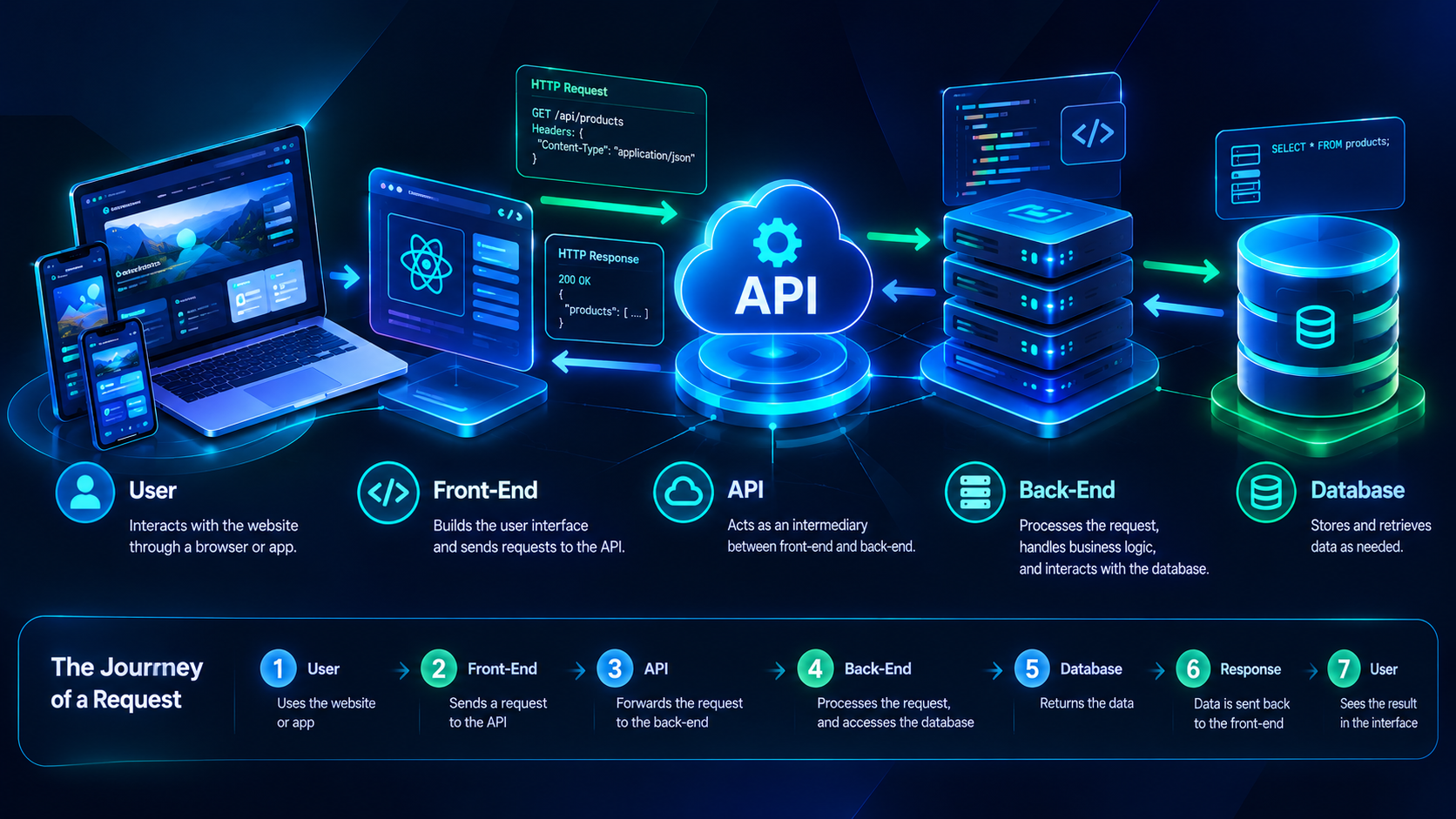
A simple process can look like this:
- The user opens the webpage.
- JavaScript sends a request to an API.
- The server receives and processes the request.
- The back end may retrieve information from a database.
- The server sends a response back to the front end.
- The front end displays the received information.
This allows APIs to provide a structured way for the user interface and server-side application to communicate.
📨 What Is a Request?
A Request is a message sent by a client to a server to request information or ask the server to perform an operation.
For example, if we want to retrieve information about a user, the front end can send an HTTP request to a specific endpoint.
GET /api/users/15In this example, the client requests information about the user with ID 15.
An HTTP Request can contain elements such as a Method, URL, Headers, and, for some requests, a Body.
📩 What Is a Response?
After receiving and processing a request, the server usually sends a Response back to the client.
A response may contain the requested data, a status indicating the result of the operation, and sometimes an error message.
For example, an API may return user information as JSON:
{
  "id": 15,
  "name": "Taha",
  "city": "Mashhad"
}
The front end can receive this data, process it, and display the required information in the user interface.
🛠️ HTTP Methods in APIs
Web APIs commonly use HTTP methods to describe the type of operation being requested. Some commonly used methods include:
GET
Usually used to retrieve information.
GET /api/productsPOST
Usually used to submit data and create a new resource or perform an operation on the server.
POST /api/productsPUT
Commonly used to replace or completely update a resource.
PUT /api/products/10PATCH
Used to apply partial changes to a resource.
PATCH /api/products/10DELETE
Used to delete a resource.
DELETE /api/products/10📦 What Is JSON and How Is It Related to APIs?
One of the most common formats for transferring data through web APIs is JSON.
JSON stands for JavaScript Object Notation. It is a text-based format that provides a simple structure for representing data.
For example:
{
  "id": 101,
  "customer": "Taha",
  "people": 4,
  "cabin": "VIP",
  "status": "confirmed"
}
The front end can receive this data, process it, and display the required information in the user interface.
🧩 What Is an Endpoint?
In an API, an Endpoint is usually a specific URL used to access a resource or perform an operation.
For example:
/api/users
/api/products
/api/bookings
/api/orders
An endpoint can behave differently depending on the HTTP method used with it.
For example:
GET    /api/bookings
POST   /api/bookings
PATCH  /api/bookings/101
DELETE /api/bookings/101
In this example, the same resource path can be used for different operations depending on the HTTP method.
🔄 How Do Front-End and Back-End Communicate Through an API?
One important use of APIs is separating the user interface from server-side application logic.
For example, a front end can send a request using JavaScript:
fetch("/api/products")
  .then(response => response.json())
  .then(data => {
    console.log(data);
  });
In this example, fetch() sends a request to the API. After receiving the response, the JSON data is extracted and made available to JavaScript.
The application can then use this information to create or update parts of the webpage.
🏗️ APIs in a Website Architecture
A simple web application architecture can look like this:
User
  ↓
Front-End
  ↓
API Request
  ↓
Back-End
  ↓
Database
  ↓
Back-End
  ↓
API Response
  ↓
Front-End
  ↓
User
In this structure, the front end handles the user interface and interaction, the back end handles application logic, and the database is used to store and retrieve data.
📊 Request vs. Response
| Item | Request | Response |
|---|---|---|
| Direction | Client → Server | Server → Client |
| Purpose | Request data or ask for an operation | Return the result |
| Example | GET /api/users/15 | User information as JSON |
🚀 Benefits of Using APIs
- Creating structured communication between different software components
- Separating the Front-End and Back-End
- Allowing multiple types of clients to use the same service
- Connecting a website with other services and systems
- Managing server-side data and operations more effectively
- Supporting web and mobile application development
For example, one API may be used by a website, a mobile application, and another service at the same time, depending on how the API is designed and secured.
🧠 What Is a REST API?
One common architectural style for web APIs is REST. REST stands for Representational State Transfer and describes a set of architectural principles for designing networked services.
In a REST-style API, resources are commonly represented by URLs, while HTTP methods are used to describe different operations.
For example:
GET    /api/users
GET    /api/users/15
POST   /api/users
PATCH  /api/users/15
DELETE /api/users/15
This structure can make an API easier to understand and use.
🔐 Do APIs Need to Be Secure?
Yes. APIs, like other parts of an application, need appropriate security based on the type of information and operations they handle.
For APIs that handle private information or sensitive operations, concepts such as authentication, authorization, input validation, error handling, and rate limiting can become important.
Sensitive information such as user passwords or private keys should not be exposed in API responses without appropriate protection.
❓ Frequently Asked Questions
Are APIs only used for websites?
No. APIs can be used to enable communication between different types of software, services, applications, and systems.
Is an API the same thing as a Back-End?
No. An API can be part of a back-end system and provide access to its data or functionality, but an API and a back end are not exactly the same concept.
Do all APIs use JSON?
No. JSON is very common, but APIs can use other formats and approaches for transferring data.
What is the difference between GET and POST?
GET is generally used to retrieve information, while POST is commonly used to submit data and create a resource or perform an operation on the server.
Are APIs only used between Front-End and Back-End?
No. APIs can also enable communication between different services, mobile applications, software systems, and other platforms.
✅ Conclusion
An API is an important concept in software and web development that enables communication between different parts of a system. In a web application, the front end can send a request to the back end through an API, and the back end can process the request and return a response.
Concepts such as Request, Response, HTTP Methods, Endpoint, JSON, and REST are important foundations for working with web APIs.
Understanding APIs helps developers design application architectures more effectively and manage communication between Front-End, Back-End, and different services in a structured way.
وقتی وارد یک وبسایت میشویم، معمولاً فقط ظاهر صفحه را میبینیم؛ اما در پشت این ظاهر، بخشهای مختلفی با یکدیگر ارتباط برقرار میکنند. فرانتاند اطلاعات را از کاربر دریافت میکند، بکاند درخواستها را پردازش میکند و در بسیاری از مواقع اطلاعات از یک دیتابیس دریافت یا در آن ذخیره میشود.
اما این بخشها چگونه با یکدیگر صحبت میکنند؟ یکی از مهمترین پاسخها به این سؤال، API است.
در این مقاله بررسی میکنیم API چیست، چگونه کار میکند، Request و Response چه هستند، چه تفاوتی میان متدهای HTTP وجود دارد و چرا API یکی از بخشهای مهم توسعه وب محسوب میشود.
🔌 API چیست؟
API مخفف Application Programming Interface است. API مجموعهای از قوانین و روشهاست که به نرمافزارها اجازه میدهد با یکدیگر ارتباط برقرار کنند و اطلاعات یا عملیات مورد نیاز خود را درخواست کنند.
در توسعه وب، API معمولاً به عنوان یک واسط بین بخشهای مختلف یک برنامه عمل میکند. برای مثال، یک رابط کاربری میتواند از طریق API اطلاعات محصولات، کاربران یا سفارشها را از سرور دریافت کند.
به زبان ساده، میتوان API را مانند یک واسطه در نظر گرفت که درخواست را از یک بخش دریافت میکند، آن را به بخش موردنظر میرساند و نتیجه را برمیگرداند.
🌐 API در یک وبسایت چگونه کار میکند؟
فرض کنید در یک فروشگاه اینترنتی، کاربر صفحه محصولات را باز میکند. ممکن است اطلاعات محصولات مستقیماً داخل HTML قرار نگرفته باشند و فرانتاند آنها را از یک API دریافت کند.
یک فرآیند ساده میتواند به این شکل باشد:
- کاربر صفحه وب را باز میکند.
- JavaScript یک درخواست به API ارسال میکند.
- سرور درخواست را دریافت و پردازش میکند.
- در صورت نیاز، بکاند اطلاعات را از دیتابیس دریافت میکند.
- سرور یک Response برای فرانتاند ارسال میکند.
- فرانتاند اطلاعات دریافتشده را در صفحه نمایش میدهد.
بنابراین API میتواند ارتباط میان رابط کاربری و منطق سمت سرور را سادهتر و ساختارمندتر کند.
📨 Request چیست؟
Request یا درخواست، پیامی است که کلاینت برای سرور ارسال میکند تا یک عملیات انجام شود یا اطلاعاتی دریافت شود.
برای مثال، اگر بخواهیم اطلاعات یک کاربر را دریافت کنیم، فرانتاند میتواند یک درخواست HTTP به یک Endpoint مشخص ارسال کند.
GET /api/users/15در این مثال، کلاینت درخواست اطلاعات کاربر با شناسه 15 را ارسال کرده است.
یک HTTP Request میتواند شامل بخشهایی مانند Method، URL، Headers و در برخی درخواستها Body باشد.
📩 Response چیست؟
پس از دریافت و پردازش درخواست، سرور معمولاً یک Response برای کلاینت ارسال میکند.
Response میتواند شامل اطلاعات موردنظر، وضعیت درخواست و در بعضی موارد پیام خطا باشد.
برای مثال، یک API ممکن است اطلاعات کاربر را به شکل JSON برگرداند:
{
  "id": 15,
  "name": "Taha",
  "city": "Mashhad"
}فرانتاند میتواند این اطلاعات را دریافت کرده و در رابط کاربری نمایش دهد.
🛠️ HTTP Methods در API
APIهای وب معمولاً از متدهای HTTP برای مشخص کردن نوع عملیات استفاده میکنند. چند متد پرکاربرد عبارتاند از:
GET
برای دریافت اطلاعات استفاده میشود.
GET /api/productsPOST
برای ایجاد یا ارسال اطلاعات جدید استفاده میشود.
POST /api/productsPUT
معمولاً برای جایگزین کردن یا بهروزرسانی کامل یک منبع استفاده میشود.
PUT /api/products/10PATCH
برای اعمال تغییرات جزئی روی یک منبع استفاده میشود.
PATCH /api/products/10DELETE
برای حذف یک منبع استفاده میشود.
DELETE /api/products/10📦 JSON چیست و چه ارتباطی با API دارد؟
یکی از فرمتهای بسیار رایج برای انتقال اطلاعات در APIهای وب، JSON است.
JSON مخفف JavaScript Object Notation است و ساختاری متنی و نسبتاً ساده برای نمایش دادهها ارائه میدهد.
برای مثال:
{
  "id": 101,
  "customer": "Taha",
  "people": 4,
  "cabin": "VIP",
  "status": "confirmed"
}فرانتاند میتواند این داده را دریافت کند، آن را پردازش کند و اطلاعات موردنیاز را در صفحه نمایش دهد.
🧩 Endpoint چیست؟
در API، Endpoint معمولاً یک URL مشخص است که برای دسترسی به یک منبع یا انجام یک عملیات استفاده میشود.
برای مثال:
/api/users
/api/products
/api/bookings
/api/orders
هر Endpoint میتواند با متدهای مختلف HTTP رفتار متفاوتی داشته باشد.
برای مثال:
GET    /api/bookings
POST   /api/bookings
PATCH  /api/bookings/101
DELETE /api/bookings/101
در این حالت یک مسیر مشابه میتواند بسته به Method، عملیات متفاوتی انجام دهد.
🔄 ارتباط Front-End و Back-End با API
یکی از کاربردهای مهم API، جدا کردن رابط کاربری از منطق سمت سرور است.
برای مثال، فرانتاند میتواند با JavaScript یک درخواست ارسال کند:
fetch("/api/products")
  .then(response => response.json())
  .then(data => {
    console.log(data);
  });
در این مثال، fetch() یک درخواست به API ارسال میکند. پس از دریافت Response، اطلاعات JSON استخراج میشود و در اختیار JavaScript قرار میگیرد.
سپس میتوان از این اطلاعات برای ساخت یا بهروزرسانی بخشهایی از صفحه استفاده کرد.
🏗️ API در معماری یک وبسایت
در یک پروژه وب میتوان معماری سادهای مانند زیر داشت:
User
  ↓
Front-End
  ↓
API Request
  ↓
Back-End
  ↓
Database
  ↓
Back-End
  ↓
API Response
  ↓
Front-End
  ↓
User
در این ساختار، فرانتاند وظیفه نمایش و تعامل با کاربر را بر عهده دارد، بکاند منطق برنامه را اجرا میکند و دیتابیس برای ذخیره و بازیابی اطلاعات استفاده میشود.
📊 تفاوت Request و Response
| مورد | Request | Response |
|---|---|---|
| جهت ارتباط | از کلاینت به سرور | از سرور به کلاینت |
| هدف | درخواست اطلاعات یا انجام عملیات | ارسال نتیجه درخواست |
| نمونه | GET /api/users/15 | اطلاعات کاربر به صورت JSON |
🚀 مزایای استفاده از API
- ایجاد ارتباط ساختاریافته بین بخشهای مختلف نرمافزار
- امکان جدا کردن Front-End و Back-End
- استفاده از یک سرویس توسط چند نوع کلاینت
- امکان ارتباط وبسایت با سرویسها و سیستمهای دیگر
- مدیریت بهتر دادهها و عملیات سمت سرور
- مناسب برای ساخت برنامههای وب و موبایل
برای مثال، یک API میتواند همزمان توسط یک وبسایت، اپلیکیشن موبایل و حتی یک سرویس دیگر مورد استفاده قرار گیرد؛ البته این موضوع به طراحی و دسترسیهای API بستگی دارد.
🧠 REST API چیست؟
یکی از سبکهای رایج برای طراحی APIهای وب، REST است. REST یا Representational State Transfer مجموعهای از اصول معماری برای طراحی سرویسهای وب است.
در یک API طراحیشده با رویکرد REST، منابع معمولاً با URL مشخص میشوند و متدهای HTTP برای عملیات مختلف مورد استفاده قرار میگیرند.
برای مثال:
GET    /api/users
GET    /api/users/15
POST   /api/users
PATCH  /api/users/15
DELETE /api/users/15
این ساختار باعث میشود API قابل فهمتر و استفاده از آن برای توسعهدهندگان سادهتر باشد.
🔐 آیا API باید امن باشد؟
بله. API نیز مانند سایر بخشهای یک برنامه باید با توجه به نوع اطلاعات و عملیات، به شکل مناسب محافظت شود.
برای APIهایی که با اطلاعات خصوصی یا عملیات حساس سروکار دارند، موضوعاتی مانند احراز هویت، مجوز دسترسی، اعتبارسنجی دادهها، مدیریت خطا و محدود کردن درخواستها اهمیت پیدا میکنند.
همچنین نباید اطلاعات حساس مانند رمز عبور کاربران یا کلیدهای خصوصی را بدون محافظت مناسب در Responseهای API قرار داد.
❓ سوالات متداول
آیا API فقط برای وبسایتها استفاده میشود؟
خیر. API میتواند برای ارتباط میان انواع مختلف نرمافزارها، سرویسها و سیستمها استفاده شود.
آیا API همان Back-End است؟
خیر. API میتواند بخشی از یک سیستم Back-End باشد و راهی برای دسترسی سایر بخشها به دادهها یا قابلیتهای آن فراهم کند، اما API و Back-End دقیقاً یک مفهوم نیستند.
آیا همه APIها از JSON استفاده میکنند؟
خیر. JSON بسیار رایج است، اما APIها میتوانند از فرمتها و روشهای دیگری نیز برای انتقال داده استفاده کنند.
تفاوت GET و POST چیست؟
GET معمولاً برای دریافت اطلاعات استفاده میشود، در حالی که POST معمولاً برای ارسال اطلاعات و ایجاد یک منبع یا انجام یک عملیات در سرور استفاده میشود.
آیا API فقط بین Front-End و Back-End استفاده میشود؟
خیر. API میتواند بین سرویسهای مختلف، نرمافزارها، اپلیکیشنهای موبایل و سیستمهای دیگر نیز ارتباط ایجاد کند.
✅ نتیجهگیری
API یکی از مفاهیم مهم در توسعه نرمافزار و وب است که امکان ارتباط میان بخشهای مختلف یک سیستم را فراهم میکند. در یک وبسایت، فرانتاند میتواند از طریق API درخواست خود را به بکاند ارسال کند و بکاند نیز پس از پردازش، نتیجه را به شکل یک Response برگرداند.
مفاهیمی مانند Request، Response، HTTP Methods، Endpoint، JSON و REST پایههای مهم کار با APIهای وب هستند.
درک درست API به توسعهدهندگان کمک میکند ساختار برنامههای خود را بهتر طراحی کنند و ارتباط میان Front-End، Back-End و سرویسهای مختلف را به شکل منظمتری مدیریت کنند.