What Is Authentication? Understanding Authentication vs Authorization in Web Security احراز هویت چیست؟ تفاوت Authentication و Authorization در امنیت وب
What Is Authentication? Understanding Authentication vs Authorization in Web Security
Security is one of the most important parts of developing websites and web applications. Many websites allow users to create accounts, sign in, view personal information, and access specific features.
To manage these features securely, developers use two important concepts called Authentication and Authorization. Although these concepts are closely related, they perform different tasks.
In this article, we will explore authentication and authorization, explain their differences, and learn how they are used in web applications.
What Is Authentication?
Authentication is the process of verifying the identity of a user or system. In simple terms, authentication answers the following question:
"Is this user really who they claim to be?"
For example, when a user signs in to an account using an email address and password, the system checks the provided information to determine whether it matches a valid account.
If the credentials are correct, the system can identify the user and create a session or issue a token for future requests.
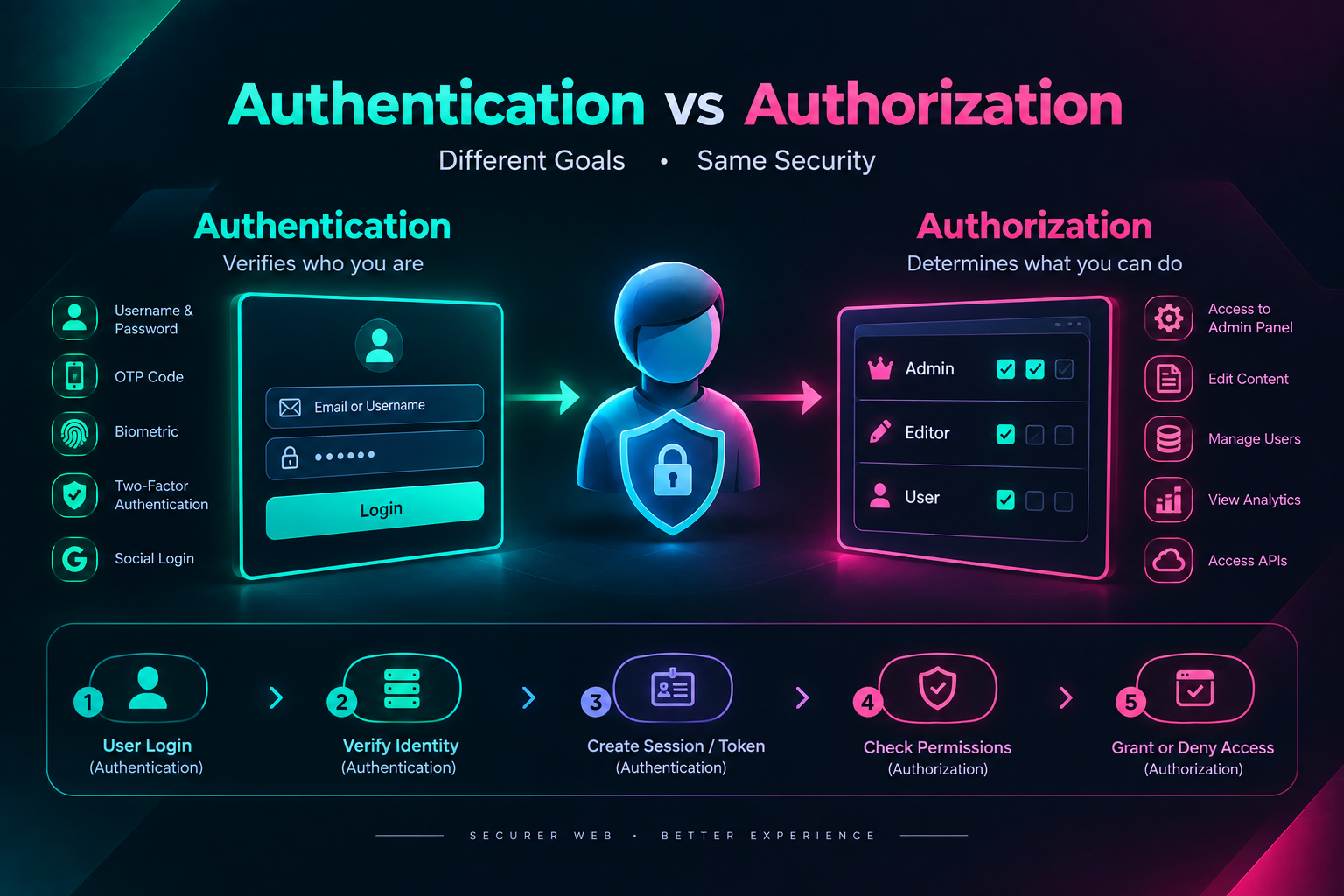
Examples of Authentication
- Signing in with a username and password
- One-time password (OTP) verification
- Two-factor authentication (2FA)
- Fingerprint or facial recognition
- Signing in through identity providers such as Google or GitHub
A Simple Authentication Example
Imagine that you visit a website and see a login form containing the following information:
- Email: user@example.com
- Password: The user's account password
The server checks the submitted information. If the credentials match a valid account, the user is authenticated. Otherwise, the system should reject the login attempt.
An important security principle is that passwords should not be stored as plain text in a database. Applications should use appropriate password-hashing algorithms and secure password-storage practices.
What Is Authorization?
Authorization is the process of determining which resources and actions an authenticated user is allowed to access.
In simple terms, authorization answers the following question:
"What is this user allowed to do?"
For example, a user may successfully sign in to a website but still be unable to access the administration panel, delete other users, or view private information belonging to other accounts.
In this situation, the user has been authenticated, but they do not have the required permission to perform the requested action.
Examples of Authorization
- Allowing administrators to access the admin panel
- Restricting regular users from changing system settings
- Allowing users to edit only their own information
- Assigning permissions to different user roles
- Restricting access to APIs and sensitive resources
Authentication vs Authorization
Authentication and authorization are two different parts of access management. Authentication verifies a user's identity, while authorization determines the level of access available to that user.
A Practical Example
Imagine that a website has two types of users:
- Regular users
- Administrators
Both users may successfully sign in to their accounts. This step is related to Authentication.
After login, the system checks the role of each user. A regular user may view their profile, while an administrator may manage users and access the administration panel. This step is related to Authorization.
How Do Authentication and Authorization Work Together?
In many web applications, authentication and authorization are performed in sequence or work together during the request process.
- The user submits their login credentials.
- The server verifies the information and accepts or rejects the identity claim.
- If authentication succeeds, the system creates a session or issues a token.
- The user sends a request to access a page or API.
- The server checks the user's identity and permissions.
- If the user has sufficient permissions, the request is processed. Otherwise, access is denied.
Successful authentication does not automatically mean that a user has permission to access every part of an application.
Common Authentication Methods on the Web
1. Session-Based Authentication
In session-based authentication, the server creates a session after a successful login. The browser commonly stores a session identifier in a cookie and sends it with later requests.
The server uses the session identifier to recognize the user. Appropriate cookie settings, such as HttpOnly, Secure, and SameSite, can help reduce certain security risks.
2. Token-Based Authentication
In token-based authentication, the system issues a token after the user has been authenticated. The client may send the token with later requests so that the server can verify the request's identity.
JSON Web Token, also known as JWT, is one example of a token format. JWT-based systems should be designed carefully with appropriate expiration, validation, and token-protection practices.
3. Two-Factor Authentication (2FA)
Two-factor authentication requires an additional verification factor besides the primary factor, such as a password. The additional factor may be a one-time code, an authenticator application, or a security key.
An additional factor can improve account security, but the implementation and the selected authentication method are important.
Common Authorization Methods
1. Role-Based Access Control (RBAC)
In Role-Based Access Control, permissions are assigned according to a user's role. For example, a system may include administrator, author, and regular user roles.
- Administrator: Manages users and system settings
- Author: Creates and edits articles
- Regular User: Uses the general account features
2. Permission-Based Access Control
In this approach, access is divided into specific permissions. For example, a user may have permission to view an article but not to edit or delete it.
3. Resource Ownership
In some systems, access is determined by resource ownership. For example, a user may be allowed to edit their own profile but not the profile information of other users.
Important Security Practices for Authentication and Authorization
- Never store passwords as plain text.
- Use appropriate and secure password-hashing algorithms.
- Validate permissions on the server, not only in the user interface.
- Implement access controls for sensitive pages and APIs.
- Manage and expire sessions and tokens appropriately.
- Use HTTPS to protect communication between clients and servers.
- Design login error messages carefully to avoid exposing sensitive information.
- Apply additional validation and security controls to sensitive operations.
Hiding a button in the user interface is not, by itself, a security mechanism. Every sensitive request must also be validated on the server.
Frequently Asked Questions
Are Authentication and Authorization the same?
No. Authentication verifies the identity of a user, while authorization determines which resources and actions the authenticated user is allowed to access.
Can authorization work without authentication?
This depends on the system and its access policy. Some public resources do not require authentication, while private resources usually require an identified user or a valid access mechanism.
Does successful login mean that the user can access the admin panel?
No. Successful login verifies the user's identity. The system must separately check whether the user has permission to access the administration panel.
Is JWT the same as authorization?
No. JWT is a token format that can be used in identity and access-related systems. The resources a user can access are determined by the application's authorization logic and access policies.
Conclusion
Authentication and Authorization are fundamental concepts in web security. Authentication verifies who a user is, while authorization determines which resources and actions that user is allowed to access.
Building a secure website requires more than creating a login page. An application must verify user identities correctly, enforce access controls on the server, and use appropriate methods for managing sessions, tokens, and passwords.
By understanding the difference between these two concepts, developers can design web applications with more reliable identity management and better access control.
© Just Programmer | Learn • Build • Grow
احراز هویت چیست؟ تفاوت Authentication و Authorization در امنیت وب
امنیت یکی از مهمترین بخشهای توسعه وبسایتها و برنامههای کاربردی است. بسیاری از وبسایتها به کاربران اجازه میدهند حساب کاربری ایجاد کنند، وارد سیستم شوند، اطلاعات شخصی خود را مشاهده کنند یا به امکانات خاصی دسترسی داشته باشند.
برای مدیریت ایمن این قابلیتها، دو مفهوم مهم به نامهای Authentication و Authorization استفاده میشوند. این دو مفهوم ارتباط نزدیکی با یکدیگر دارند، اما وظایف متفاوتی دارند.
در این مقاله، با مفهوم احراز هویت و مجوزدهی آشنا میشویم، تفاوت آنها را بررسی میکنیم و یاد میگیریم که چگونه در پروژههای وب از آنها استفاده میشود.
Authentication چیست؟
Authentication یا احراز هویت، فرایندی است که در آن هویت یک کاربر یا سیستم بررسی میشود. به زبان ساده، احراز هویت پاسخ این سؤال را مشخص میکند:
«آیا این کاربر همان شخصی است که ادعا میکند؟»
برای مثال، هنگامی که یک کاربر با ایمیل و رمز عبور خود وارد حساب کاربری میشود، سیستم اطلاعات واردشده را بررسی میکند تا مشخص شود آیا این اطلاعات با یک حساب معتبر مطابقت دارند یا خیر.
اگر اطلاعات صحیح باشند، سیستم میتواند کاربر را شناسایی کرده و یک نشست کاربری یا توکن برای ادامه فعالیت او ایجاد کند.
نمونههایی از Authentication
- ورود با نام کاربری و رمز عبور
- ورود با کد یکبارمصرف (OTP)
- احراز هویت دومرحلهای (2FA)
- ورود با اثر انگشت یا تشخیص چهره
- ورود از طریق سرویسهای هویتی مانند Google یا GitHub
مثال ساده از احراز هویت
فرض کنید وارد یک وبسایت میشوید و فرم زیر را مشاهده میکنید:
- ایمیل: user@example.com
- رمز عبور: رمز عبور حساب کاربر
سرور اطلاعات را بررسی میکند. اگر اطلاعات با یک حساب معتبر مطابقت داشته باشند، کاربر احراز هویت میشود. در غیر این صورت، سیستم باید ورود را رد کند.
نکته مهم این است که رمز عبور نباید بهصورت متن ساده در پایگاه داده ذخیره شود. سیستمها باید از روشهای مناسب هشکردن رمز عبور مانند الگوریتمهای مخصوص ذخیره امن رمز استفاده کنند.
Authorization چیست؟
Authorization یا مجوزدهی، فرایندی است که مشخص میکند یک کاربر احراز هویتشده به چه منابع و امکاناتی اجازه دسترسی دارد.
به زبان ساده، Authorization پاسخ این سؤال را مشخص میکند:
«این کاربر چه اجازهای برای انجام یک کار دارد؟»
برای مثال، ممکن است یک کاربر با موفقیت وارد وبسایت شده باشد، اما اجازه دسترسی به پنل مدیریت، حذف کاربران یا مشاهده اطلاعات خصوصی سایر افراد را نداشته باشد.
در این شرایط، احراز هویت کاربر موفق بوده است، اما مجوز لازم برای انجام عملیات موردنظر را ندارد.
نمونههایی از Authorization
- اجازه دسترسی مدیر به پنل مدیریت
- محدود کردن دسترسی کاربران عادی به تنظیمات سایت
- اجازه ویرایش فقط اطلاعات متعلق به همان کاربر
- تعیین سطح دسترسی برای نقشهای مختلف
- محدود کردن دسترسی به APIها و منابع حساس
تفاوت Authentication و Authorization
احراز هویت و مجوزدهی دو مرحله متفاوت در مدیریت دسترسی هستند. Authentication هویت کاربر را بررسی میکند، درحالیکه Authorization سطح دسترسی او را مشخص میکند.
مثال کاربردی
فرض کنید یک وبسایت دارای دو نوع کاربر است:
- کاربر عادی
- مدیر سایت
هر دو کاربر ممکن است با موفقیت وارد حساب خود شوند. این مرحله مربوط به Authentication است.
پس از ورود، سیستم نقش هر کاربر را بررسی میکند. کاربر عادی میتواند پروفایل خود را مشاهده کند، اما مدیر سایت میتواند کاربران را مدیریت کرده و به بخش مدیریت دسترسی داشته باشد. این مرحله مربوط به Authorization است.
Authentication و Authorization چگونه با یکدیگر کار میکنند؟
در بسیاری از برنامههای وب، این دو فرایند بهصورت پشتسرهم یا در ارتباط با یکدیگر اجرا میشوند.
- کاربر اطلاعات ورود خود را ارسال میکند.
- سرور اطلاعات را بررسی کرده و هویت کاربر را تأیید یا رد میکند.
- در صورت موفقیت، سیستم یک Session یا Token ایجاد میکند.
- کاربر درخواست دسترسی به یک صفحه یا API را ارسال میکند.
- سرور هویت کاربر و سطح دسترسی او را بررسی میکند.
- اگر مجوز کافی وجود داشته باشد، درخواست انجام میشود؛ در غیر این صورت، دسترسی رد میشود.
احراز هویت موفق بهتنهایی به این معنی نیست که کاربر اجازه دسترسی به تمام بخشهای سیستم را دارد.
روشهای رایج Authentication در وب
۱. Session-Based Authentication
در روش مبتنی بر Session، سرور پس از ورود موفق کاربر، یک نشست ایجاد میکند. مرورگر معمولاً شناسه نشست را در یک کوکی ذخیره میکند و آن را در درخواستهای بعدی ارسال میکند.
سرور با استفاده از شناسه نشست، کاربر را شناسایی میکند. تنظیمات مناسب کوکی مانند HttpOnly، Secure و SameSite میتواند به کاهش برخی خطرات امنیتی کمک کند.
۲. Token-Based Authentication
در روش مبتنی بر Token، سیستم پس از احراز هویت یک توکن صادر میکند. کلاینت ممکن است این توکن را در درخواستهای بعدی ارسال کند تا سرور بتواند هویت درخواست را بررسی کند.
یکی از نمونههای شناختهشده این روش، JSON Web Token یا JWT است. استفاده از JWT باید با طراحی مناسب، مدیریت انقضا و محافظت از توکنها انجام شود.
۳. احراز هویت دومرحلهای (2FA)
در احراز هویت دومرحلهای، علاوه بر عامل اصلی مانند رمز عبور، یک عامل دیگر نیز برای تأیید هویت استفاده میشود. این عامل میتواند کد یکبارمصرف، برنامه تولیدکننده کد یا یک کلید امنیتی باشد.
استفاده از یک عامل اضافی میتواند امنیت حساب را افزایش دهد، اما نحوه پیادهسازی و روش انتخابشده اهمیت زیادی دارد.
روشهای رایج Authorization
۱. Role-Based Access Control (RBAC)
در مدل RBAC، دسترسیها بر اساس نقش کاربر مشخص میشوند. برای مثال، نقشهای یک سیستم میتوانند شامل مدیر، نویسنده و کاربر عادی باشند.
- مدیر: مدیریت کاربران و تنظیمات سیستم
- نویسنده: ایجاد و ویرایش مقالات
- کاربر عادی: استفاده از امکانات عمومی حساب
۲. Permission-Based Access Control
در این روش، دسترسیها به مجوزهای مشخص تقسیم میشوند. برای مثال، یک کاربر ممکن است مجوز مشاهده مقاله را داشته باشد، اما مجوز حذف یا ویرایش آن را نداشته باشد.
۳. مالکیت منابع
در بعضی سیستمها، دسترسی به یک منبع بر اساس مالکیت آن تعیین میشود. برای مثال، کاربر میتواند اطلاعات پروفایل خود را ویرایش کند، اما اجازه تغییر اطلاعات سایر کاربران را ندارد.
نکات مهم امنیتی در احراز هویت و مجوزدهی
- رمزهای عبور را بهصورت متن ساده ذخیره نکنید.
- برای رمزهای عبور از الگوریتمهای امن و مناسب هشکردن استفاده کنید.
- دسترسیها را در سمت سرور بررسی کنید، نه فقط در رابط کاربری.
- برای صفحات و APIهای حساس، کنترل دسترسی مناسب ایجاد کنید.
- Sessionها و Tokenها را با روش مناسب مدیریت و منقضی کنید.
- از HTTPS برای محافظت از ارتباطات استفاده کنید.
- پیامهای خطای ورود را طوری طراحی کنید که اطلاعات حساس را افشا نکنند.
- برای عملیات حساس، کنترلهای امنیتی و اعتبارسنجی بیشتری در نظر بگیرید.
مخفی کردن یک دکمه در رابط کاربری، بهتنهایی یک روش امنیتی محسوب نمیشود. هر درخواست حساس باید در سمت سرور نیز بررسی شود.
سؤالات متداول
آیا Authentication و Authorization یکسان هستند؟
خیر. Authentication هویت کاربر را بررسی میکند، اما Authorization مشخص میکند کاربر احراز هویتشده چه دسترسیهایی دارد.
آیا بدون Authentication میتوان Authorization انجام داد؟
این موضوع به نوع سیستم و سیاست دسترسی آن بستگی دارد. برخی منابع عمومی به احراز هویت نیاز ندارند، اما دسترسی به منابع خصوصی معمولاً به شناسایی کاربر یا بررسی یک مجوز معتبر نیاز دارد.
آیا ورود موفق به معنی دسترسی به پنل مدیریت است؟
خیر. ورود موفق فقط هویت کاربر را تأیید میکند. سیستم باید جداگانه بررسی کند که کاربر مجوز دسترسی به پنل مدیریت را دارد یا خیر.
آیا JWT همان Authorization است؟
خیر. JWT یک قالب توکن است که میتواند برای انتقال اطلاعات و پیادهسازی فرایندهای هویتی استفاده شود. اینکه یک کاربر به چه منابعی دسترسی دارد، به منطق Authorization و سیاستهای دسترسی سیستم مربوط است.
نتیجهگیری
Authentication و Authorization از مفاهیم اساسی امنیت در توسعه وب هستند. احراز هویت مشخص میکند کاربر چه کسی است، درحالیکه مجوزدهی تعیین میکند آن کاربر به چه امکانات و منابعی اجازه دسترسی دارد.
برای ساخت یک وبسایت امن، تنها پیادهسازی صفحه ورود کافی نیست. سیستم باید هویت کاربران را بهدرستی بررسی کند، دسترسیها را در سمت سرور کنترل کند و از روشهای مناسب برای مدیریت نشستها، توکنها و رمزهای عبور استفاده کند.
با درک تفاوت این دو مفهوم، توسعهدهندگان میتوانند سیستمهای کاربری امنتر و قابلکنترلتری طراحی کنند.
© Just Programmer | Learn • Build • Grow